Blog How to Adjust the Brakes on a Dual Brake Rolling Walker
Last updated: June 2, 2025
Most dual brake rolling walkers have adjustment points at the handles and near the base where the rear wheels attach. While I often receive requests to tune up walker brakes, I'm currently unable to provide in-person service. Therefore, I've created this guide to help you adjust your braking system at home.
Step 1: Adjusting at the Handles
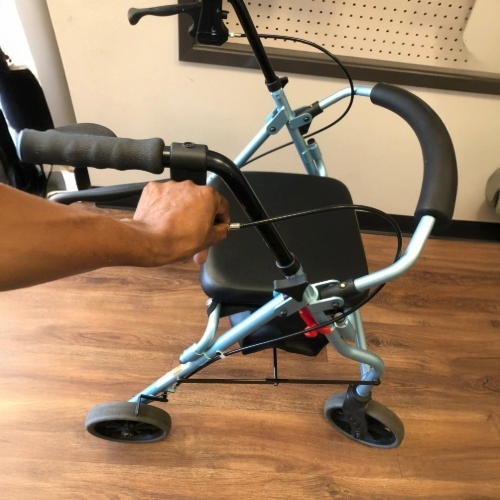
Locate the brake adjustment knob at the handle where the brake cable is attached. Using two fingers or a pair of pliers, turn the adjustment knob clockwise while the brake is in the locked position. This increases the tension. Once you're satisfied with the feel of the brake, proceed to the next step.
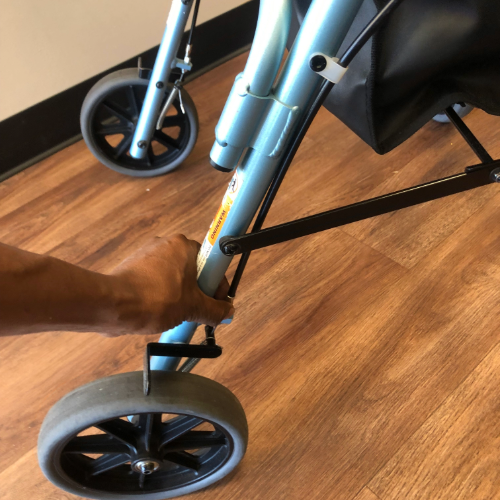
Step 2: Adjusting Near the Wheels
Move to the lower section near the rear wheels. Locate the brake adjustment mechanism and repeat the adjustment process on both sides of the walker.
Common Brake Issues
Several factors can cause your brakes to malfunction:
Loose Screws: Screws securing the brake cable may need tightening or replacement.
Worn Rubber: The rubber on the wheels can wear down over time, reducing brake effectiveness.
Damaged Brake Cable: If the brake cable is damaged or broken, tightening won't help.
Final Tips
This technique works for most rollators, but some models have hidden or integrated brakes that may require a different approach. Always use caution and consult your walker's user manual or contact your product dealer for the best results.